Ticket Master Pro for WooCommerce
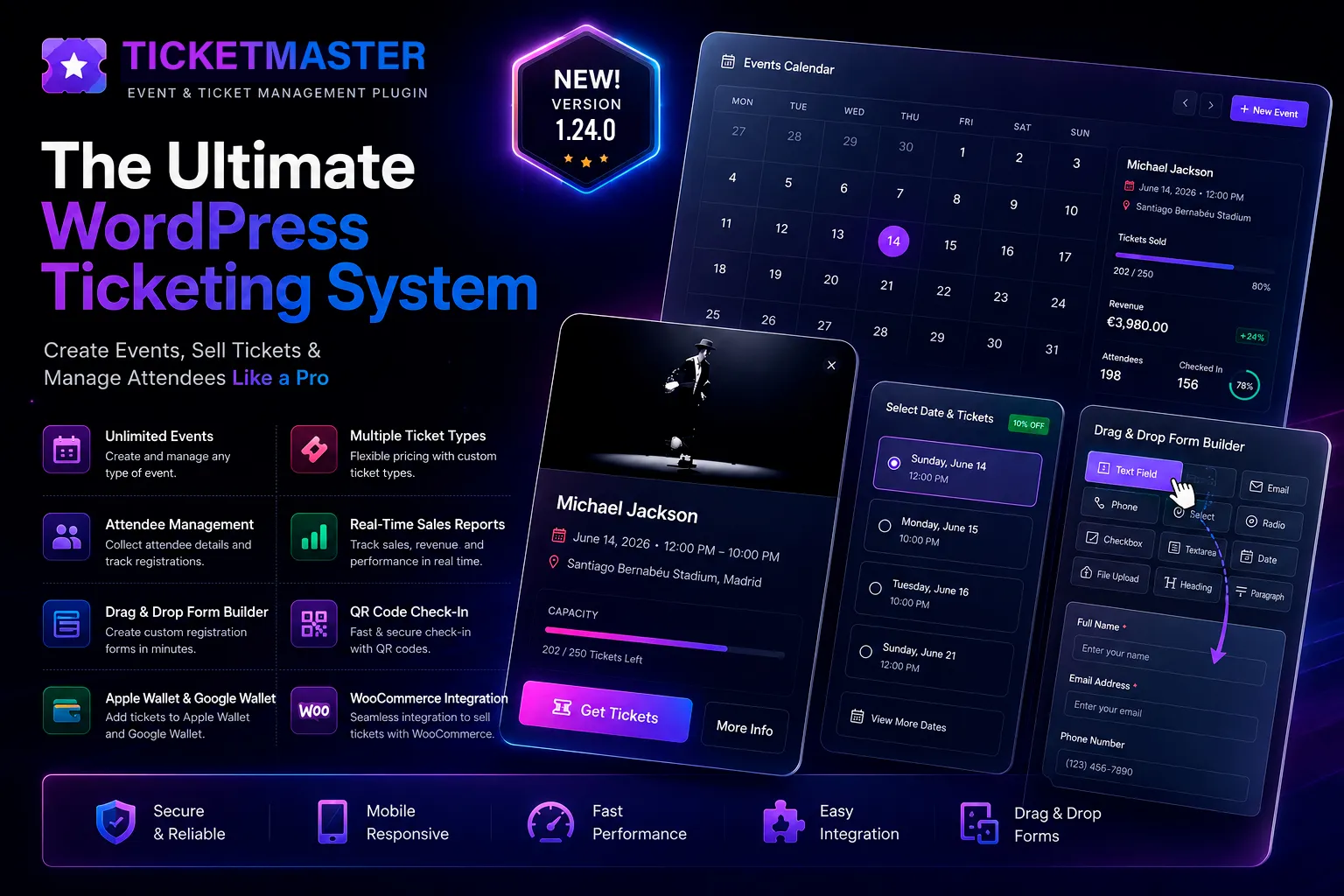
A complete ticketing system
Sell tickets for your events straight from your own WordPress site, with no third-party commission and full control over the buying experience.
Version: 1.25.18
Release date: 13/06/2026
What’s new:
- Compatible with the Seat Map add-on
- Direct admin shortcut to edit an event
- Several bug fixes
Features
Event management. Create events with multiple dates and times, capacity per date, a countdown on the event page, and a date picker with progressive discounts for attendees who book several dates at once.
Attendee forms. Each ticket type has its own attendee form with 14 field types (text, email, phone, dropdown, radio, checkbox, date, file upload and more), conditional logic, per-option pricing, per-option passwords, and content fields with a popup, link or attached image.
Digital tickets. Generate PDF tickets with a fully customisable design using a drag-and-drop visual editor, a unique QR code per attendee and dynamic tokens (name, date, venue, coupon, discount). Compatible with Google Wallet and Apple Wallet.
Ticket scanner. Validate tickets at the door from any device with a camera, in real time, with no external app needed.
Reports and exports. Export attendees to CSV, schedule automatic email reports (daily, weekly or on a set date) and check sales statistics for each event.
Full WooCommerce integration. Coupons, configurable booking fees, an automatic waiting list, webhooks to connect external systems, and event reminders.
Licensing. Activation per domain with automatic periodic checks. Manage your customers from the La Factorie licence dashboard.
For your customers
Event page. Customers land on a clean page with the event image, title, description, venue and address, and a countdown to the start. If the event has several dates, they see a visual picker where they can choose one or more. The price updates automatically for the dates selected, applying the progressive discount you set for multi-date bookings.
Ticket type and form. Below the date picker, the attendee form for the chosen ticket type appears. Customers fill in their details: name, attendee type, date of birth, dress code, terms of sale or any field you’ve set up. With conditional logic, fields appear and disappear based on their answers, without reloading the page.
Cart and checkout. In the cart, customers see a summary of their order with the attendee details clearly laid out, the chosen date, the ticket type and the price. They can apply WooCommerce discount coupons. If you’ve set a booking fee, it’s added to the order automatically.
Confirmation email with tickets attached. Once the purchase is complete, customers receive a confirmation email with their PDF tickets attached, one per attendee and date. The email includes the order details, any coupon applied, the discount amount and the total paid.
Google Wallet and Apple Wallet. From the confirmation email, customers can save their ticket to Google Wallet in one click, without installing any app. The pass is created automatically with the event details and QR code. Apple Wallet for iPhone is also supported.
Waiting list. If the event sells out, customers can join the waiting list with their email. When a place becomes available, they’re notified automatically.
Customer account. Customers can see all their tickets from their WooCommerce account, download the PDFs and check the status of each ticket.
For admins
Event management. Create events with a cover image, description, venue with address and city, and a countdown that appears automatically on the event page. Each event can have multiple dates and times: a Friday at 22:00, a Saturday at 18:00 and another at 23:00, all within the same event. Capacity is controlled per date rather than globally, so you never sell more tickets than each session can hold.
Ticket types. Each event can have as many ticket types as you need: general admission, VIP, couples, tables, season passes. Each type has its own price, attendee form, PDF design and WooCommerce product, created automatically.
Attendee form per ticket type. The attendee form is built with a drag-and-drop visual editor. Drag in the fields you need, reorder them, set their properties in the side panel and save. There are 14 field types: text, email, phone, number, dropdown, radio, checkbox, text area, date, file upload, heading, paragraph, rich content and divider. Any field can be required, apply per attendee and use conditional logic to show or hide fields based on earlier answers. Dropdown, radio and checkbox fields can have a price per option (add-on, discount or fixed price), an access password per option, a thumbnail or icon per option, and a link, popup or attached image to show extra information such as a dress code, house rules or a picture of the table.
Visual PDF editor. Design the ticket your customers receive with a drag-and-drop editor. Place the QR code, event name, date, venue, attendee name, order number, coupon applied, discount amount, event notes and any free text wherever you like. Each ticket type can have its own PDF design.
Ticket scanner. Validate tickets at the door from any phone, tablet or computer with a camera. No app to install: the scanner runs in the browser, shows in real time whether a ticket is valid, already used or invalid, and logs the time of entry. You can give staff the scanner role without access to the rest of the admin area.
Reports and exports. Export each event’s attendee list to CSV in one click, including all form data, coupon used, discount applied, amount paid and ticket type. You can also schedule automatic email reports: once on a set date and time, or daily or weekly. A manual send button is there whenever you need it.
Sales management. See how many tickets have sold by type, date and status right from each event’s dashboard. Cancel individual tickets, manage the waiting list when an event sells out, and set up webhooks to connect TicketMaster Pro with external systems such as CRMs, email marketing tools or automation platforms.
Event page layout. Choose the event page width from five options: narrow (700px), normal (900px), wide (1100px), extra wide (1400px) or full screen, to match your site’s design.
Licensing. Activate and manage your licence from Settings → Licence. The licence is checked automatically in the background every day. If it expires or is deactivated, the plugin stops showing events on the front end until it’s reactivated.
Installation: €298.00
Delivered in 1 to 3 working days.
Custom plugin tailoring: from €135
Delivered in 3 to 6 working days.
Features
- Events with multiple dates, times and capacity per date
- Attendee forms with 14 field types and conditional logic
- PDF tickets with a visual editor, unique QR code and Google/Apple Wallet
- Ticket scanner from any phone, no app needed
- Reports, CSV export and scheduled email reports
- Coupons, booking fees, waiting list, webhooks and reminders
- Compatible with the Seat Map add-on